
A CRO audit tells you exactly where your website is losing leads. Not in theory. In specific, fixable places you can check in under an hour.
This is the same 15-point conversion rate optimization checklist we run on every new client’s website during the first week at Creative Options Marketing. We’ve used it across B2B firms in LoDo, service companies in the Denver Tech Center, and SaaS startups in Boulder. The pattern is consistent: most sites fail 5 to 8 of these checks, and fixing just 3 of them moves the needle.
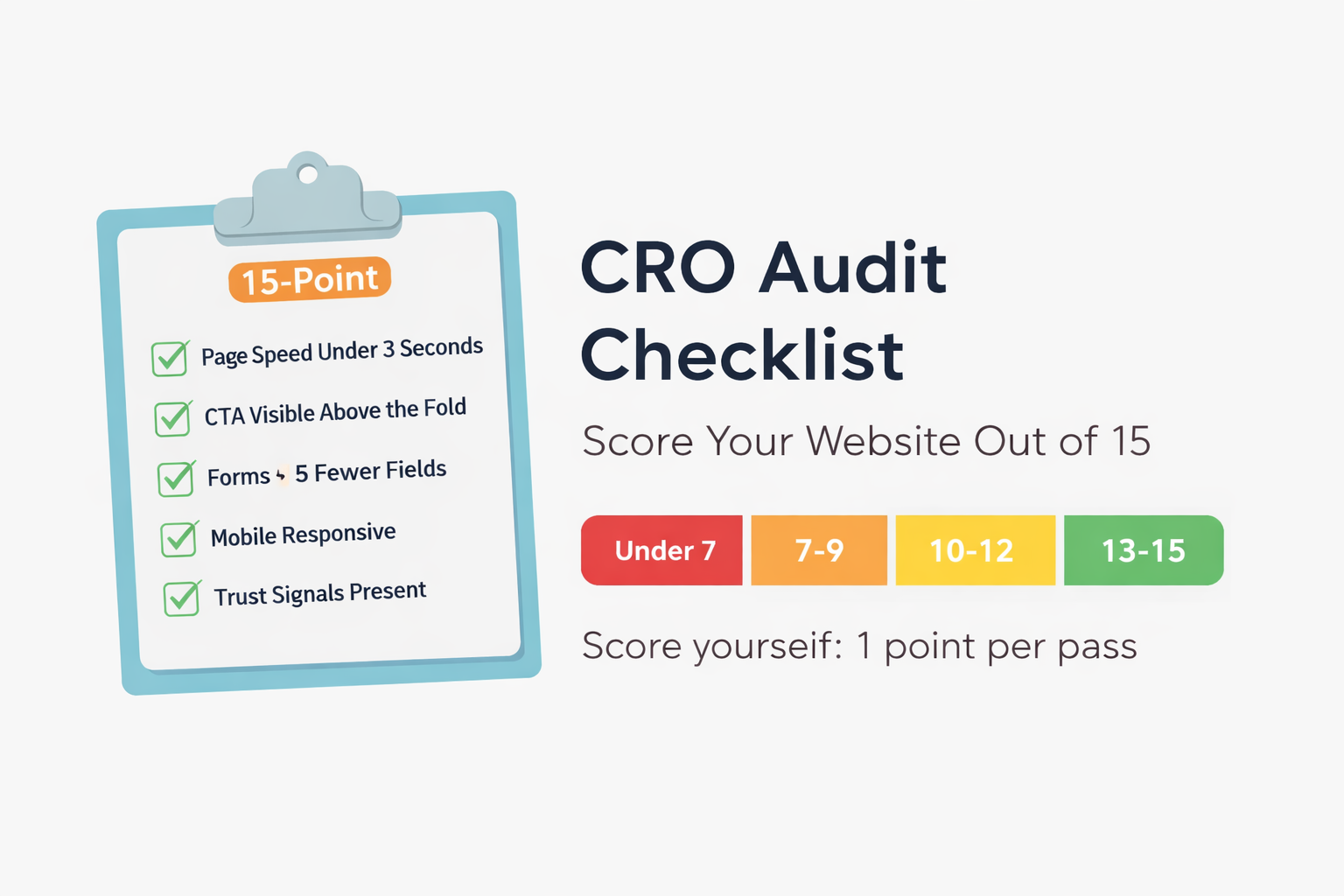
Score yourself as you go. Each item you pass earns one point. At the end, you’ll know exactly where your site stands and what to fix first.
How to Use This Checklist
- Pick your top 3 pages by traffic (homepage, main service page, top landing page).
- Work through all 15 items. Score 1 point for each pass.
- Start with the 3 quick wins in the “What to Fix First” section below.
What Is a CRO Audit (and Why Score It)?
A CRO audit is a scored review of the page elements that drive conversions – so you can find friction points and prioritize fixes instead of guessing.
It covers page speed, calls to action, trust signals, forms, navigation, and tracking. Most conversion rate optimization audit guides give you a list of things to check but no way to measure where you stand. That’s why this checklist is scored. A number gives you a baseline. It lets you compare your site before and after changes. And it makes prioritization simple – fix the items you failed first.
This checklist covers on-page conversion elements. It doesn’t cover traffic acquisition, SEO technical health, or paid ad performance – those are separate audits with different criteria.
How scoring works: Give yourself 1 point for each item you pass. 15 is perfect. Under 10 means you’re leaving conversions on the table. Under 7 means your site needs immediate attention.
The 15-Point CRO Audit Checklist
Grab a pen or open a spreadsheet. Work through each item on your highest-traffic pages first.
1. Page Load Speed (Under 3 Seconds)
Run your URL through Google PageSpeed Insights. Your page should load in under 3 seconds on mobile. Between 3 and 4 seconds is a gray zone – you won’t lose everyone, but you’re losing some. Over 4 seconds is a clear fail. Oversized images and uncompressed scripts are usually the culprits.
Pass: Mobile load time under 3 seconds. Fail: Over 4 seconds. (3-4 seconds: fix it, but don’t panic.)
2. Mobile Responsiveness
Open your site on your phone. Tap every button. Fill out every form. If you have to pinch, zoom, or scroll sideways, you fail. Mobile devices now account for the majority of web traffic according to StatCounter. A site that works on desktop but breaks on mobile is half a site.
Pass: All elements usable without zooming. Fail: Any element requires pinching or horizontal scroll.
3. Clear Value Proposition Above the Fold
Load your homepage. Without scrolling, can a first-time visitor tell what you do, who you serve, and why they should care? We see this constantly with Cherry Creek professional services firms – beautiful sites with no clear statement of what problem they solve.
Pass: Value proposition visible without scrolling. Fail: Visitor has to scroll or click to understand what you offer.
4. Primary CTA Visibility
Your main call to action should be visible within 2 seconds of landing on any key page. It should be a bold, distinct color that pops off the page. “Contact Us” buried in the nav bar doesn’t count.
Pass: CTA is visible, specific, and stands out from surrounding elements. Fail: CTA is hidden, generic, or fades into the page.
5. Form Length and Friction
Count the fields on your main lead form. Every field beyond name, email, and one qualifying question adds friction to your conversion funnel. In our work with a Denver B2B client, cutting their form from 9 fields to 4 produced a 34% increase in form submissions within one month.
Pass: 5 or fewer fields on primary form. Fail: 6+ fields or fields that require information visitors won’t have handy.
Quick Win: Form length is the fastest fix on this list. You can trim fields in 10 minutes and see results within a week. If you only fix one thing today, start here.
6. Trust Signals Present
Look for client logos, testimonials, reviews, certifications, or case study results on your key pages. Trust signals reduce hesitation. A page without any social proof is asking visitors to take your word for it – and most won’t.
Pass: At least 2 trust signals visible on each key page. Fail: No reviews, logos, or proof points on conversion pages.
7. Navigation Simplicity
Count your top-level nav items. If you have more than 7, you’re creating decision fatigue. Dropdown menus with 20+ options are worse. Too many choices means no decision at all.
Pass: 7 or fewer top-level nav items, logical grouping. Fail: 8+ items or confusing dropdown structure.
8. Content-to-CTA Path
Pick any page on your site. How many clicks does it take to reach a form or contact page? If the answer is more than 2, you have a path problem. Every page should have a CTA on it or be one click away from one.
Pass: Every page is within 2 clicks of a conversion action. Fail: Dead-end pages or paths that require 3+ clicks.
Halfway through your CRO audit? If you’ve already failed 4 or more items, your site has real conversion problems. We run this same audit in much more detail during our free website evaluations. Email us to schedule your free CRO audit – we’ll show you exactly what to fix and in what order.
CRO Audit Checklist (Continued)
9. Social Proof Placement
Testimonials and reviews work best when placed near CTAs – not on a separate “Testimonials” page nobody visits. Check if your strongest proof points are positioned where visitors are making decisions.
Pass: Social proof appears near CTAs and on high-intent pages. Fail: Social proof is isolated on its own page.
10. Exit Points and Distractions
Look for competing CTAs, auto-playing videos, unnecessary pop-ups, or outbound links on your main conversion pages. Each one gives visitors a reason to leave. A strong landing page has one job and removes everything else.
Pass: Conversion pages have one clear goal with minimal distractions. Fail: Multiple competing CTAs or outbound links on conversion pages.
11. Analytics Tracking Active
Log in to Google Analytics. Check that your tracking code is firing on all pages. Then check that conversion goals or events are set up. If you’re not tracking form submissions, phone clicks, and button clicks, you’re guessing about what works. With third-party cookies going away, make sure you’re collecting first-party data through server-side tracking or GA4’s built-in event model. In our audits across Colorado B2B accounts, roughly 4 out of 10 businesses have broken or incomplete tracking.
Pass: GA4 active on all pages with conversion events configured. Fail: Missing tracking code or no conversion events set up.
12. Landing Page Message Match
If you run paid ads, click one of your own ads and land on the destination page. Does the headline match the ad copy? Does the offer match? Message mismatch is one of the top reasons paid campaigns underperform. The ad promises one thing, the page delivers another, and the visitor bounces. For a deeper look at full conversion rate optimization strategy, see our CRO guide.
Pass: Landing page headline and offer match ad copy. Fail: Headline, offer, or visual doesn’t match what the ad promised.
13. Thank You Page Optimization
After someone fills out your form, what do they see? “Thanks, we’ll be in touch” wastes a high-intent moment. Instead, try something like: “We’ll email you within 2 business hours. While you wait, here’s our conversion guide.” Your thank you page should set expectations, offer a next step, and reinforce trust. This is also a strong spot for a micro-conversion – a related resource or newsletter signup.
Pass: Thank you page includes timeline, next step, and trust reinforcement. Fail: Generic “thanks” message with no next step.
14. Contact Information Visible
Can a visitor find your email, phone number, or physical address without hunting? For local businesses, visible contact info signals legitimacy. If someone has to dig through three menus to find how to reach you, some of them won’t bother.
Pass: Contact info in header, footer, or sidebar on all pages. Fail: Contact details only on the contact page.
15. Lead Magnet or Secondary Conversion
Not every visitor is ready to call or fill out a form. Do you offer a lower-commitment option – a downloadable guide, newsletter signup, or free tool? A secondary conversion (sometimes called a micro-conversion) captures visitors who aren’t ready to buy but are interested enough to exchange their email. See our data-driven marketing approach for how we use these leads in our conversion funnel.
Pass: At least one lead magnet or secondary conversion available. Fail: Only “contact us” as the conversion option.
How to Score Your CRO Audit
Add up your points. Here’s what your score means:
| Score | Rating | What It Means |
|---|---|---|
| 13 – 15 | Strong | Your site is built to convert. Focus on A/B testing specific elements – headline variations, CTA copy, form placement. |
| 10 – 12 | Good Foundation | The basics are solid. Fix the gaps and you’ll see measurable improvement. |
| 7 – 9 | Needs Work | You’re losing leads to fixable problems. Prioritize the quick wins below. |
| Under 7 | Significant Issues | Your website is actively working against you. Start with the top 3 fixes immediately. |
For context: across the Colorado businesses we’ve audited over the past 3 years, the average first-audit score lands around 8 out of 15. Most sites have strong branding but weak conversion mechanics.
What to Fix First
If you scored under 10, don’t try to fix everything at once. Start with the three items that deliver the fastest results with the least effort.
Top 3 Quick Wins
- Trim your forms (Item 5). Takes 10 minutes. Impact shows within days.
- Make your CTA impossible to miss (Item 4). Change the color, increase the size, move it above the fold. One hour of work.
- Add contact info to your header or footer (Item 14). A 5-minute change that builds trust on every page.
After the quick wins, move to structural fixes – page speed, mobile responsiveness, and analytics tracking. These take more time but compound over months.
This audit gives you a snapshot. For ongoing optimization, pair it with monthly conversion tracking and quarterly re-audits.
If you want the diagnostic version of this – figuring out why your site isn’t converting before you know what to check – read our post on 9 signs your website isn’t converting visitors into leads.
Don’t skip analytics tracking (Item 11). Without it, you can’t measure if your other fixes are working. Set up GA4 conversion events before changing anything else so you have a baseline to compare against.
About Creative Options Marketing
Creative Options Marketing is a Denver-based digital marketing agency that’s been helping Colorado businesses grow since 2009. We audit B2B, SaaS, and professional services sites across Colorado. We specialize in SEO, content marketing, and conversion optimization – and we measure everything.
Scored Under 10? Let Us Run the Full Audit.
This checklist covers the basics. Our full CRO audit goes deeper:
- Heatmap and click-tracking analysis
- User flow and conversion funnel review
- Competitor benchmarking
- Prioritized fix list with projected impact
- GA4 event setup and tracking verification
It’s free. No obligation. Just clear answers about what’s holding your site back.
Schedule Your Free CRO AuditFrequently Asked Questions About CRO Audits
A CRO audit is a structured review of your website’s ability to convert visitors into leads or customers. It examines page speed, CTAs, trust signals, form design, navigation, and analytics tracking to identify what’s costing you conversions.
A basic self-audit using a checklist like this one takes 30 to 60 minutes. A professional conversion audit with heatmap analysis, user testing, and funnel reviews typically takes 1 to 2 weeks depending on site complexity.
At minimum, once per year. Quarterly is better for businesses running paid campaigns or making frequent site updates. Run an audit any time you redesign pages, change your offer, or notice a drop in lead volume.
At minimum: Google Analytics for conversion data, Google PageSpeed Insights for load time, and your own eyes for a manual walkthrough. For deeper analysis, add Hotjar or Microsoft Clarity for heatmaps and session recordings.
Common benchmarks suggest B2B websites convert between 2% and 5% of visitors. Well-optimized sites with strong landing pages can push higher. Your target depends on your industry, traffic quality, and what counts as a conversion – a form fill, phone call, or booked meeting.
Yes. This 15-point CRO audit checklist is designed for business owners and marketing directors to self-audit. Where you’ll benefit from professional help is interpreting analytics data, running A/B tests, and implementing structural site changes.
A website audit covers technical SEO, site health, indexing, and crawlability. A CRO audit focuses on conversion performance – how well your site turns visitors into leads. They overlap on page speed and mobile responsiveness, but a website conversion audit goes deeper into CTAs, forms, trust signals, and user flow.
David Drewitz is a marketing strategist with over 20 years of experience helping Denver businesses grow. As the founder of Creative Options Marketing, he specializes in SEO, conversion optimization, and digital marketing strategy. Connect with David on LinkedIn.